

Sympa Email Commands for List Owners
List owners can manage their lists by emailing commands to the list server (Sympa) or via the web interface. See Sympa's Web Interface:A Short Guide for Listowners for information and instructions on using Sympa's web interface.
Send commands to [email protected] in plain text format. Several commands can be sent in a single message but only one command can be entered on a line.
Command Examples
- Add subscriber to list: ADD listname [email protected] John Doe
- Add without notificationQUIET ADD listname [email protected] Doe, John
- Remove a subscriberDEL listname [email protected] J. Doe
- Remove without notification QUIET DEL listname [email protected] John Doe
- Review the subscriber listREVIEW listname
- Indicate the end of commandsQUIT
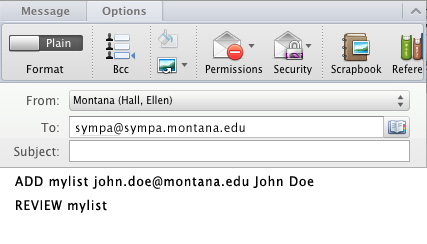
Email message with multiple commands
Commands
| Command | Description |
|---|---|
| ADD | Add a member to the list |
| DEL | Remove a member from list |
| QUIET | Enter quiet before add or del command to prevent a notification message from being sent to the person being added or deleted. |
| QUIET ADD QUIET DEL |
Add without notification Remove without notification |
| REVIEW | Use to get a review of list members |
| QUIT | Use as the final command so email signature will be ignored |
Help
Please contact MSU List Help ([email protected]) for additional assistance.